- DATE:
- AUTHOR:
- The folks at Scrut
Stay on top of updates with the new Notifications Center
What's new?
A new Notifications Centre consolidates all important Scrut updates in one place. Access it via the bell icon in the top bar, which displays a red badge with your unread count. This release includes notifications for billing alerts, platform downtime, integration updates, and other key announcements.
Why it matters
No more searching across modules to find critical updates. The Notifications Centre helps you quickly identify what needs attention, such as billing issues, system downtime, or integrations that require action.
How it works
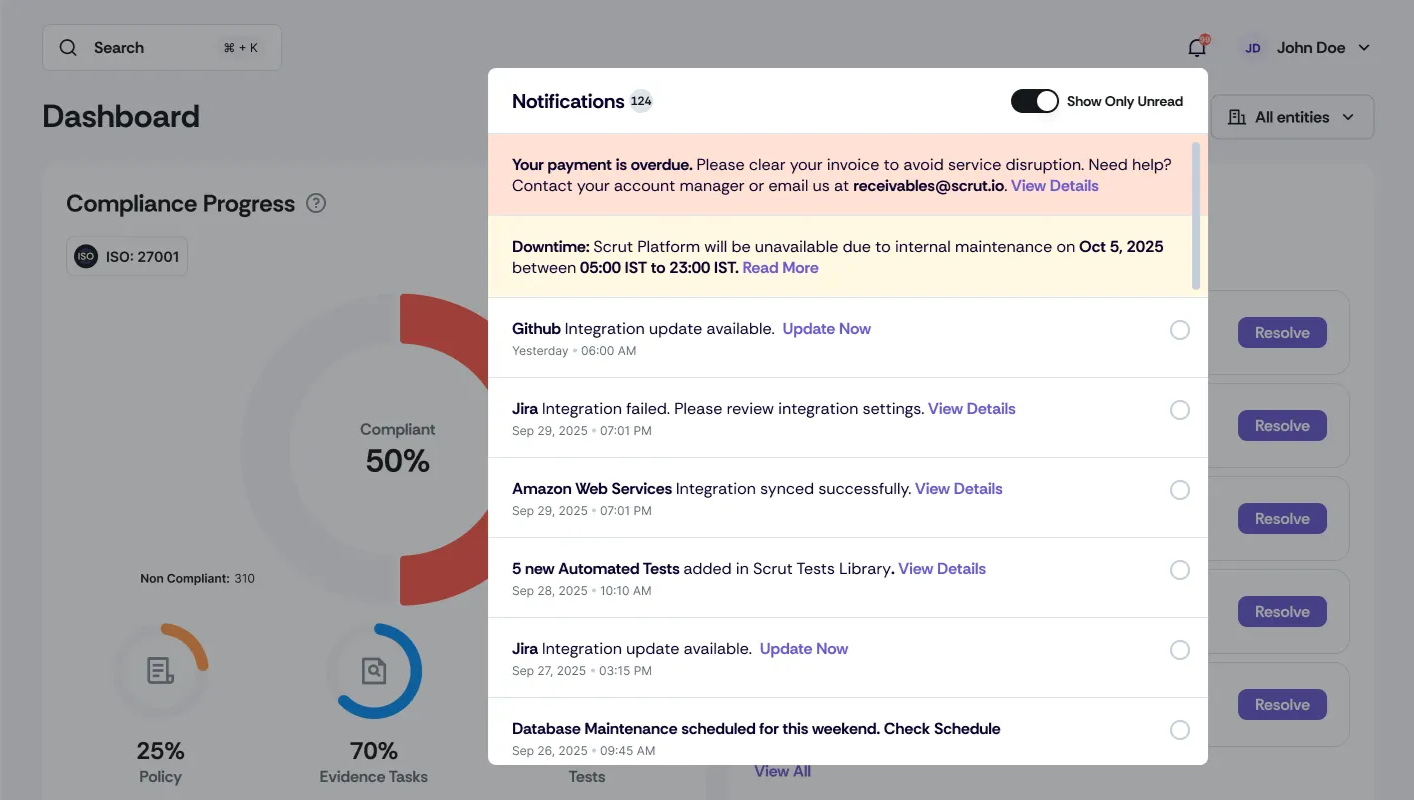
Click the bell icon in the top bar to view your notifications.
Notifications are ordered by priority. The most important ones always appear first. Others are sorted from newest to oldest. Critical notifications (like billing or downtime) remain visible until addressed.
Notifications include CTAs that navigate you directly to the relevant modules in Scrut.
Notification timestamps match your local timezone with "Today"/"Yesterday" labels for recent items and full dates for older ones
Click the circle to the right of a notification to mark it as read.
Use the “Show Only Unread” toggle to focus on new items.
Notifications are unique to your account and role, so you’ll only see what’s relevant to you.
Need help?
Your Customer Success Manager (CSM) is always ready to help if you need assistance. Explore all recent product updates → View now.