- DATE:
- AUTHOR:
- The folks at Scrut
Improved document privacy settings in the Trust Vault
What's new?
The Trust Vault module in Scrut has been updated with two UI improvements to reduce confusion around document privacy settings.
The label "Private Control" has been renamed to "Make all documents private" to accurately reflect that the setting applies only to documents, not to the entire control or framework.
The privacy checkbox is now conditionally visible, appearing only when one or more documents are present. It remains hidden when no documents have been added.
Why was this needed?
The previous label "Private Control" caused confusion on whether the entire control or framework was being restricted. Showing the privacy toggle even when no documents were present added to that confusion. These changes improve the user experience of making framework and control documents private.
How it works
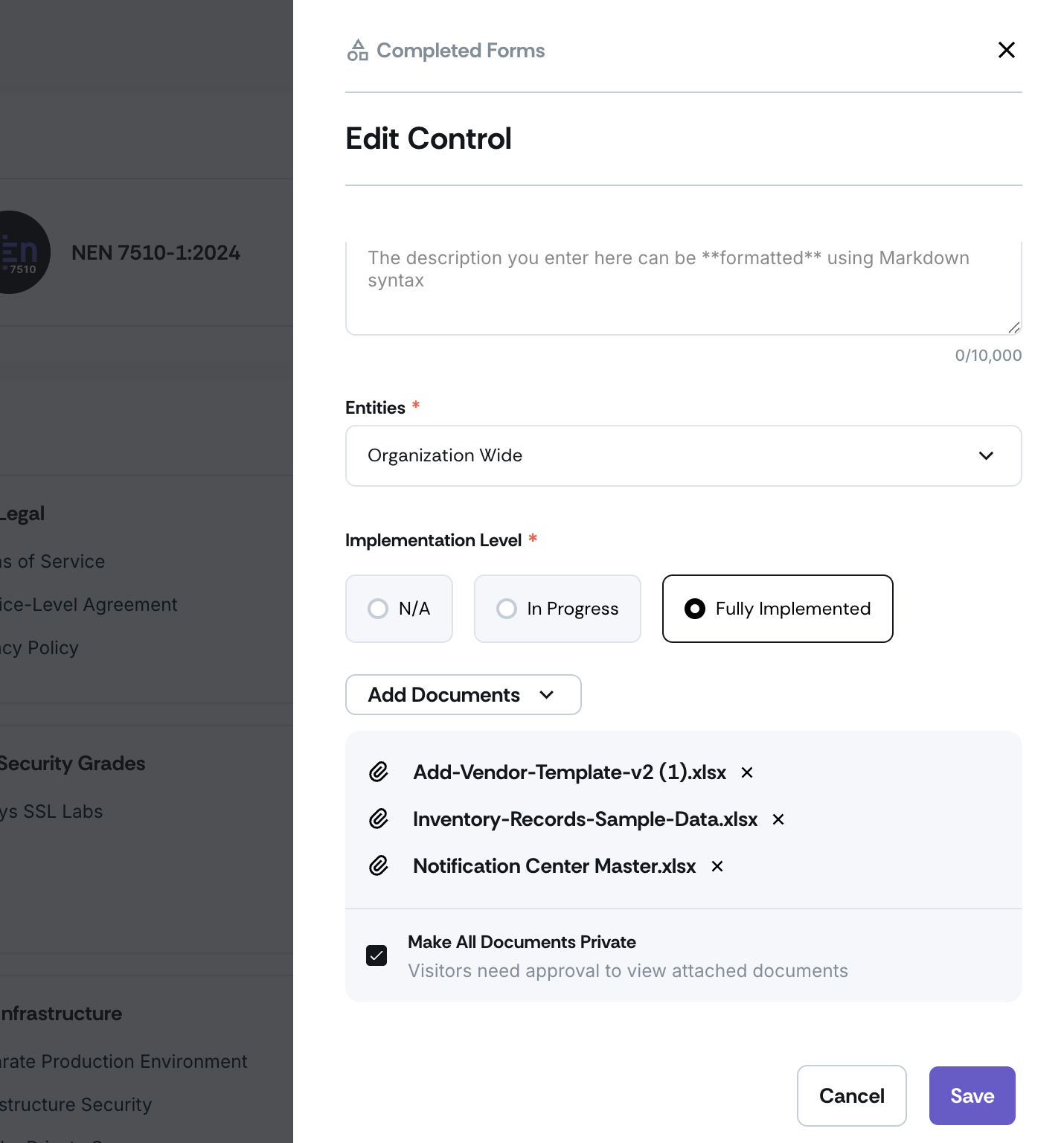
Navigate to Trust -> Trust Vault -> Overview tab and scroll to the Compliance or Controls section.
The document privacy setting becomes visible only when you add one or more documents to the framework or control.
Select the checkbox to make all documents within that control or framework private.
The checkbox will not appear until at least one document has been added, keeping the interface clean and contextually relevant.
Need help?
Your Customer Success Manager (CSM) is always ready to help if you need assistance. Explore all recent product updates → View now.