- DATE:
- AUTHOR:
- The folks at Scrut
View all resources impacted by Vulnerabilities in one tab
What's new?
A dedicated Resources tab is now available alongside the existing Findings tab in Vulnerability -> Third Party Scans page. The tab shows all resources impacted by scan findings in a consolidated view, with summary cards for total resource count and status breakdown at a glance.
Why was this needed?
The vulnerability management workflow previously required you to navigate to individual CVEs to identify which resources were affected. For teams managing large or complex infrastructure, this made it difficult to answer the most important question quickly: which of your assets are most at risk?
The Resources tab lets you quickly investigate which resources are at risk, without clicking through every vulnerability.
How it works
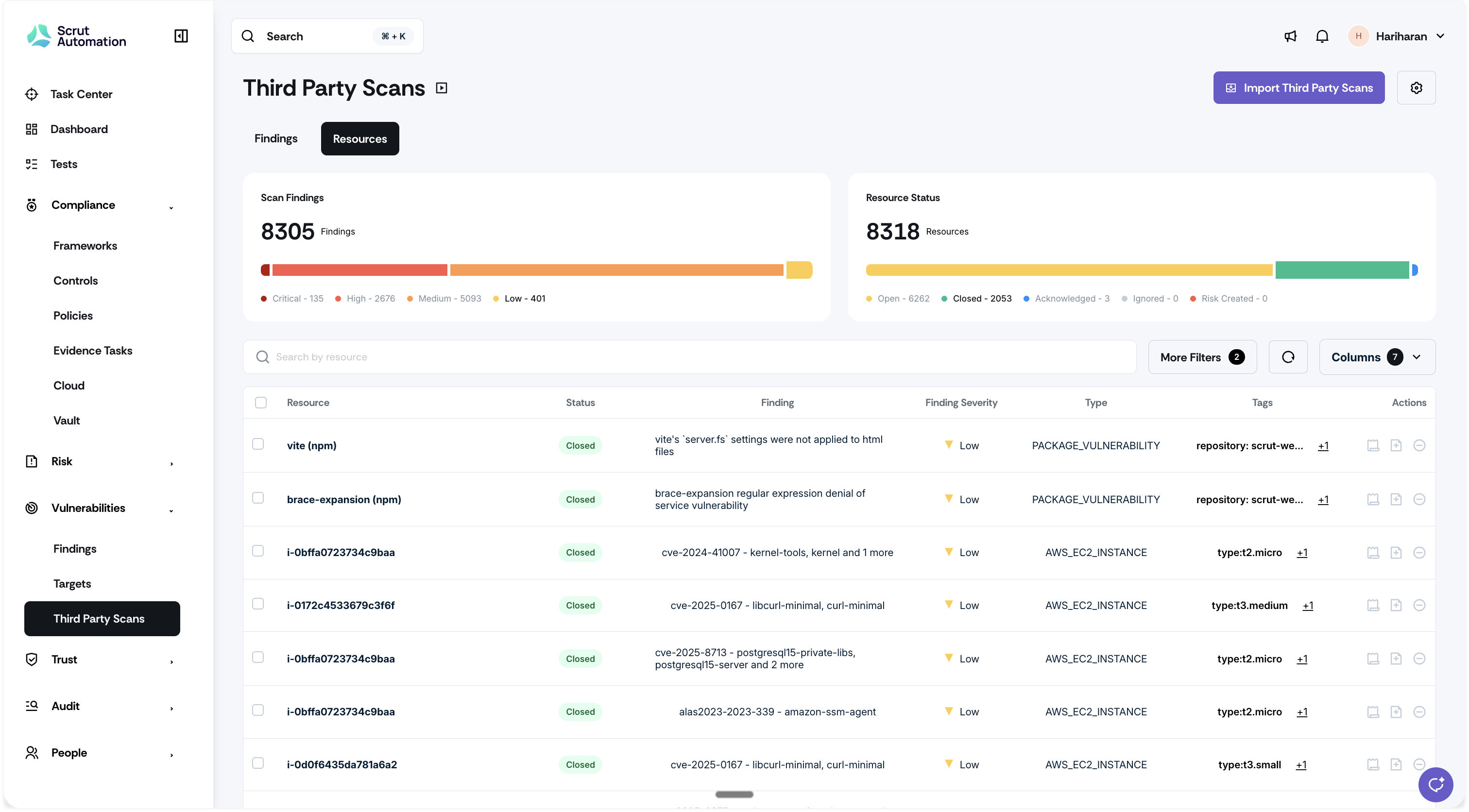
Navigate to Vulnerabilities -> Third Party Scans.
Switch to the Resources tab to see all impacted resources in a consolidated view.
Review the summary cards for an at-a-glance breakdown of the total resource count and status distribution.
Apply filters to narrow down resources by status (Open, Closed, Acknowledged, Ignored, Risk Created), first seen date, action taken, or finding severity.
Use the filtered view to identify high-risk resources and prioritize remediation by blast radius.
Need help?
Your Customer Success Manager (CSM) is always ready to help if you need assistance. Explore all recent product updates → View now.