- DATE:
- AUTHOR:
- The folks at Scrut
Seamlessly navigate between notifications and the Task Center
What's new?
The Notification Center is now directly integrated with Task Center. New tasks assigned to you automatically surface in the Notification Center, and clicking a task-related notification takes you to a pre-filtered Task Center view showing exactly those tasks. Additionally, you can now mark all notifications as read in a single action in the Notifications Center.
Why was this needed?
Discovering newly assigned tasks previously required checking the Task Center directly. Now, the Notification Center becomes your go-to place to view new work, so nothing slips through. And instead of clearing notifications one by one, bulk mark-as-read lets you manage a backlog in seconds and stay focused on what matters.
How it works
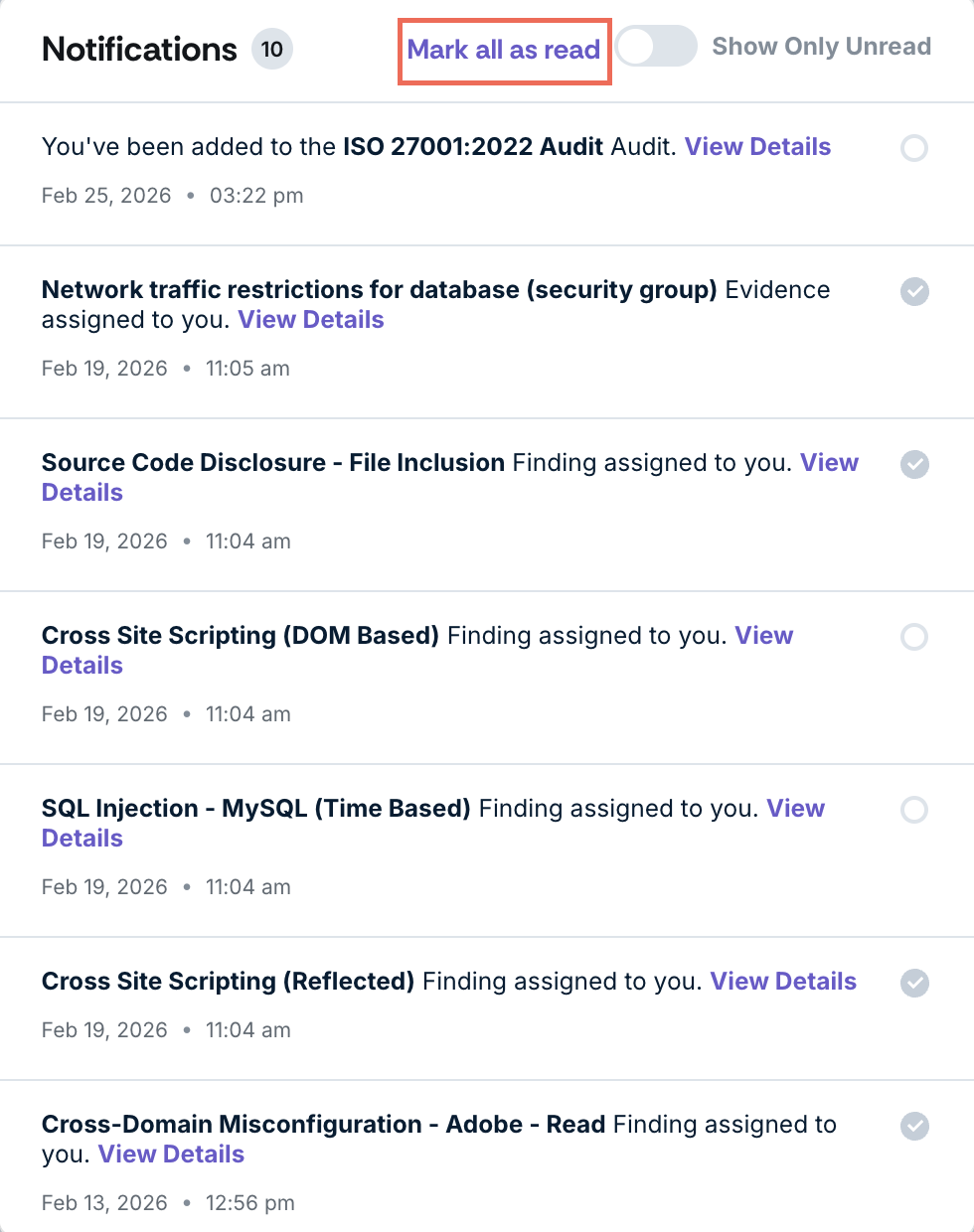
Use the Mark All as Read option to clear all notifications in a single action.
Open the Notification Center to view newly assigned tasks along with other updates.
Click a task-related notification to be taken directly to the Task Center, pre-filtered to show only the relevant task or tasks.
Need help?
Your Customer Success Manager (CSM) is always ready to help if you need assistance. Explore all recent product updates → View now.