- DATE:
- AUTHOR:
- The folks at Scrut
Manage Cloud Test resources efficiently with bulk actions
What's new?
The Resources tab in Cloud Tests now supports bulk actions. You can select multiple resources using checkboxes and perform actions like ignoring resources or assigning an assignee to all selected resources at once.
Why was this needed?
Managing large sets of Cloud Test resources one by one was repetitive and time-consuming. Bulk actions reduce manual effort, speed up remediation and ownership assignment, and make Cloud Test management more efficient at scale.
How it works
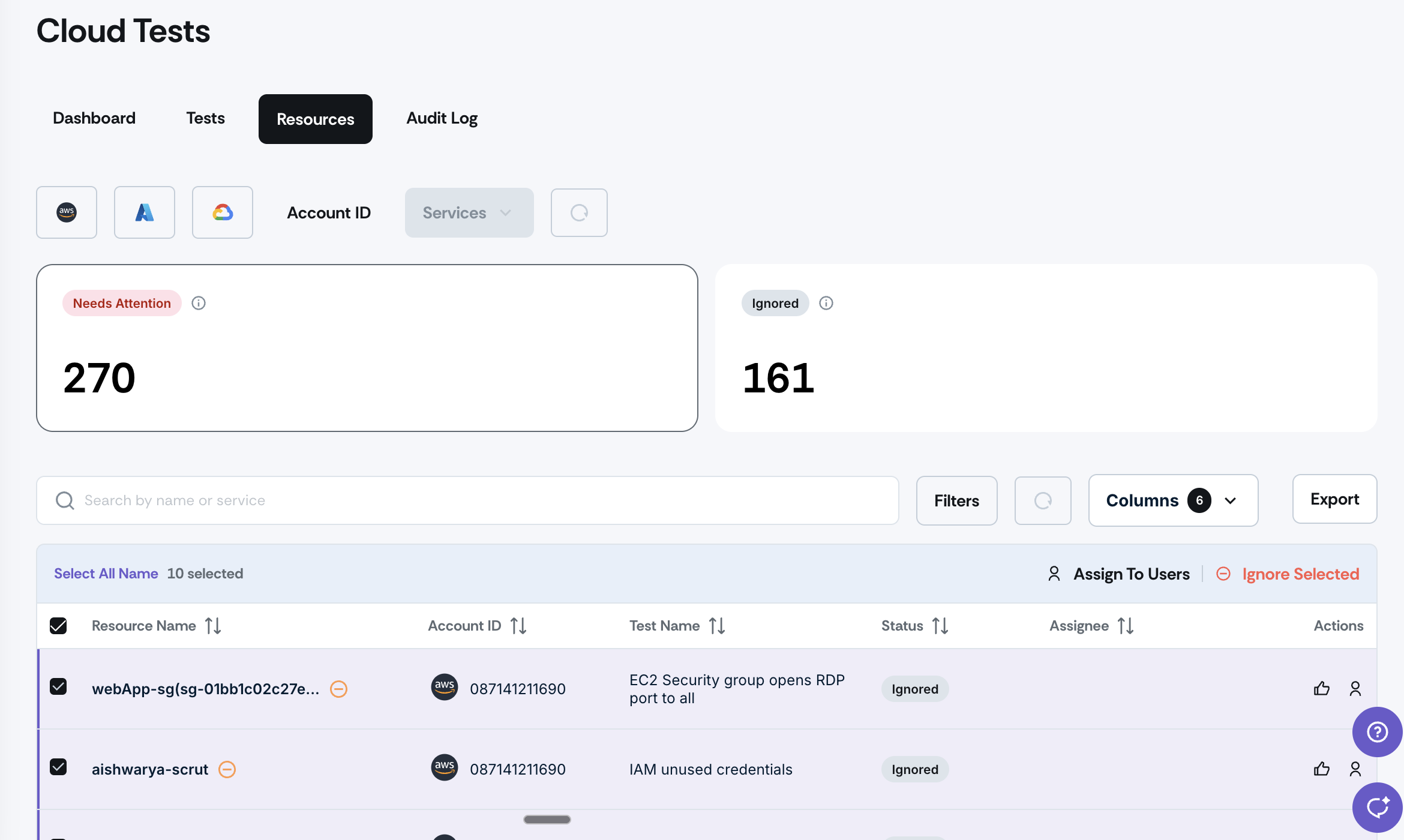
Navigate to the Resources tab in any Cloud Test
Select multiple resources using checkboxes in the Resources table
Choose from available bulk actions:
Ignore multiple resources in a single action
Assign an assignee to all selected resources at once
Complete your bulk operation to quickly manage large resource sets
Need help?
Your Customer Success Manager (CSM) is always ready to help if you need assistance. Explore all recent product updates → View now.