- DATE:
- AUTHOR:
- The folks at Scrut
Remediate vulnerabilities quicker with enriched third-party scan details
What's new?
Third-party scan findings in Vulnerability Management now include enriched metadata that was not previously available. Each finding displays the CVSS score, the last-scanned date, a complete list of affected resources, and a full treatment plan with remediation guidance, directly on the finding's detail page.
Why was this needed?
Acting on vulnerabilities from third-party tools required toggling between multiple screens and consulting external documentation to piece together the full picture of impact and remediation steps. This update brings all critical context into a single view so you can triage, prioritize, and remediate without leaving Scrut.
How it works
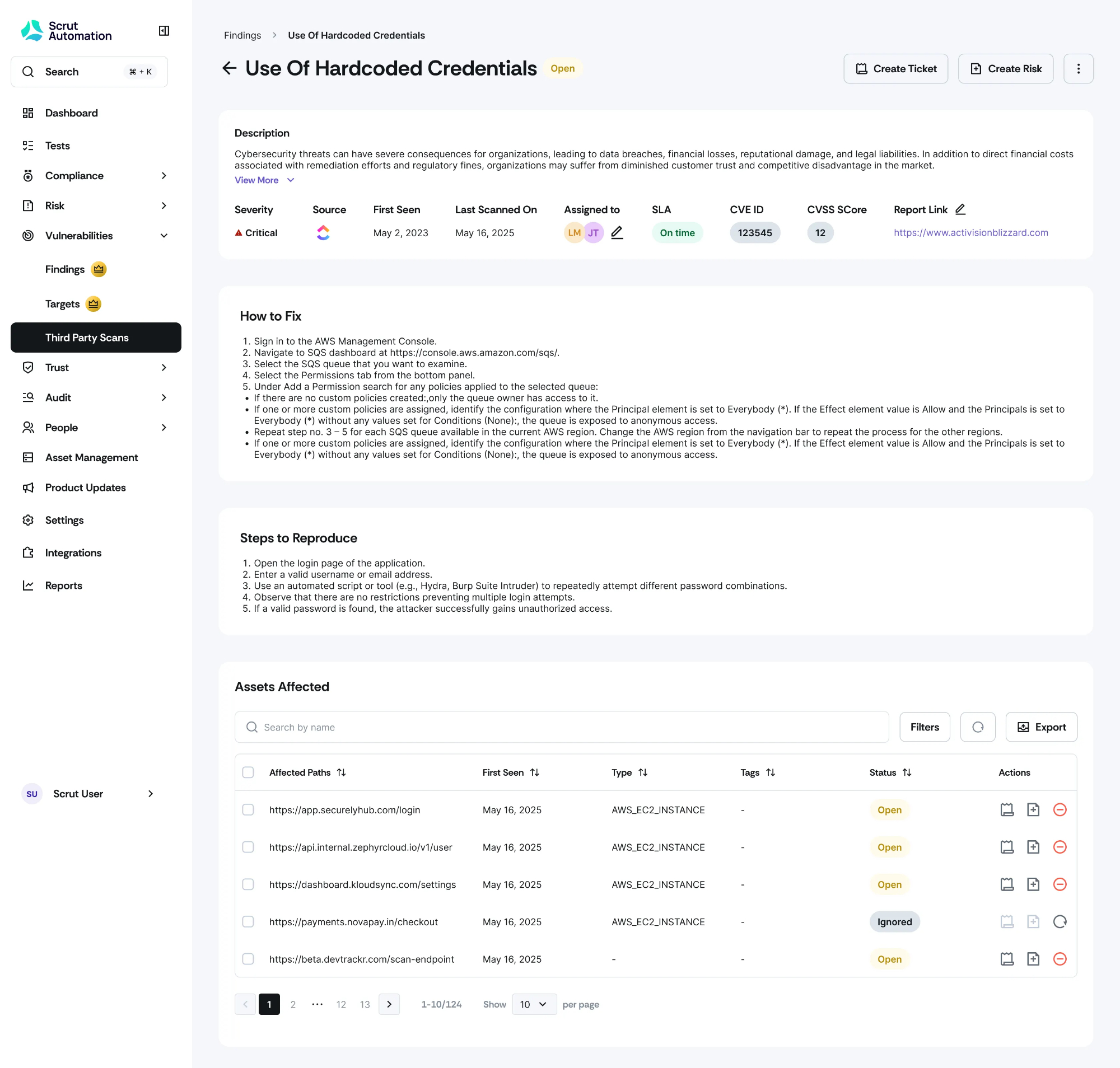
Navigate to Vulnerabilities -> Third Party Scans and open a finding to access the new, enriched detail page.
Review the CVSS score to assess severity using industry-standard measurements and prioritize accordingly.
Check the Last Scanned On date to understand how recently the vulnerability was detected.
Review the Assets Affected table to see every impacted asset.
Follow the How to Fix section for step-by-step remediation guidance.
Need help?
Your Customer Success Manager (CSM) is always ready to help if you need assistance. Explore all recent product updates → View now.