- DATE:
- AUTHOR:
- The folks at Scrut
Setup wizard is now part of the Task Center
What's new?
The Task Center unifies the Setup Wizard and ongoing compliance tasks in one single place. It is organized across three tabs:
My Tasks for your personal to-do list
Audit Prep for framework-specific readiness
Continuous Compliance for ongoing work after you are audit-ready
Why was this needed?
Before this update, the Setup Wizard guided you through initial onboarding, while ongoing compliance tasks were scattered across individual modules like policies, evidence, risk, vendors, and audits. Now everything is in one place, so you always know what needs your attention and what to do next. With dedicated views for audit preparation and continuous compliance, you can stay on top of both one-time and recurring work without switching between modules.
How it works
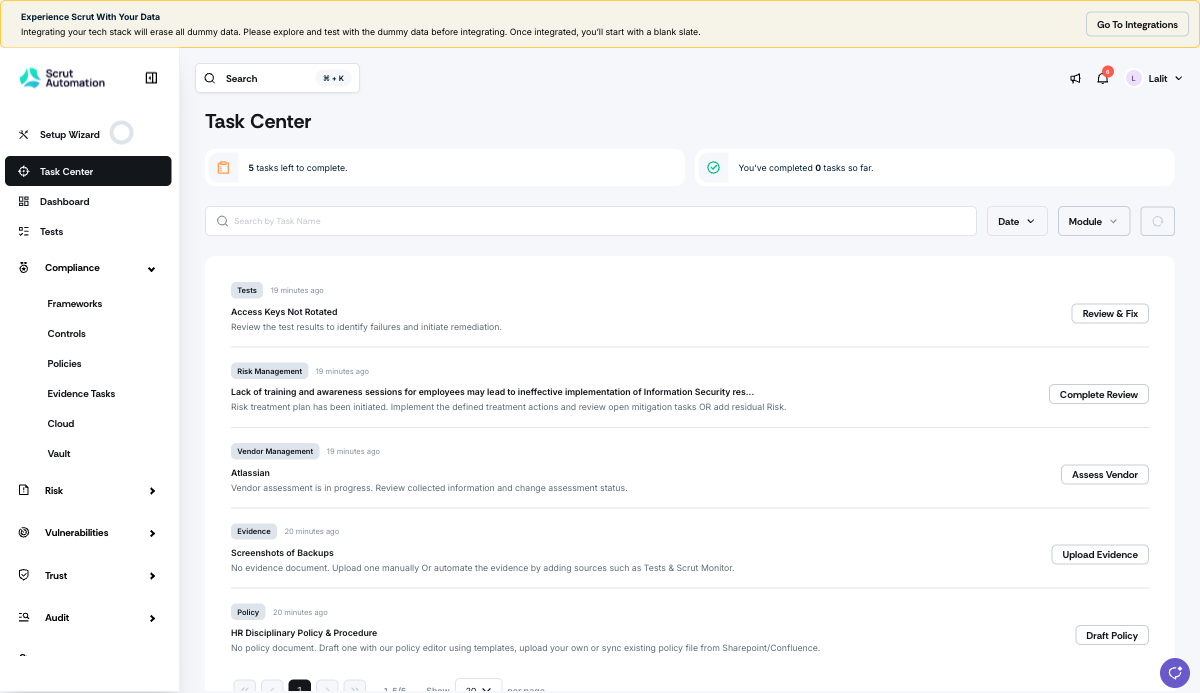
Sign in to Scrut and click Task Center on the left sidebar.
Use the My Tasks tab to view every task assigned to you across modules, along with clear next actions and progress counters.
Use the Audit Prep tab to track framework-specific readiness for SOC 2, ISO 27001, GDPR, and other frameworks, and see exactly what remains before your next internal or external audit.
Use the Continuous Compliance tab to manage recurring work after audit readiness, including evidence collection, failing tests, risks to reassess, and vendors to re-evaluate.
Need help?
Your Customer Success Manager (CSM) is always ready to help if you need assistance. Explore all recent product updates → View now.