- DATE:
- AUTHOR:
- The folks at Scrut
Skip templates and import assets with guided field mapping
What's new?
You can now import assets into Scrut's Asset Management module using any CSV or Excel file, without following a predefined template. Our import wizard guides you through mapping your data fields to Scrut, so you can upload files directly from existing tools, cloud exports, or internal spreadsheets without reformatting.
Why was this needed?
Asset data often lives in different tools and formats. This update eliminates the need for manual cleanup or restructuring, making it significantly faster and easier to bring large, complex asset inventories into Scrut.
How it works
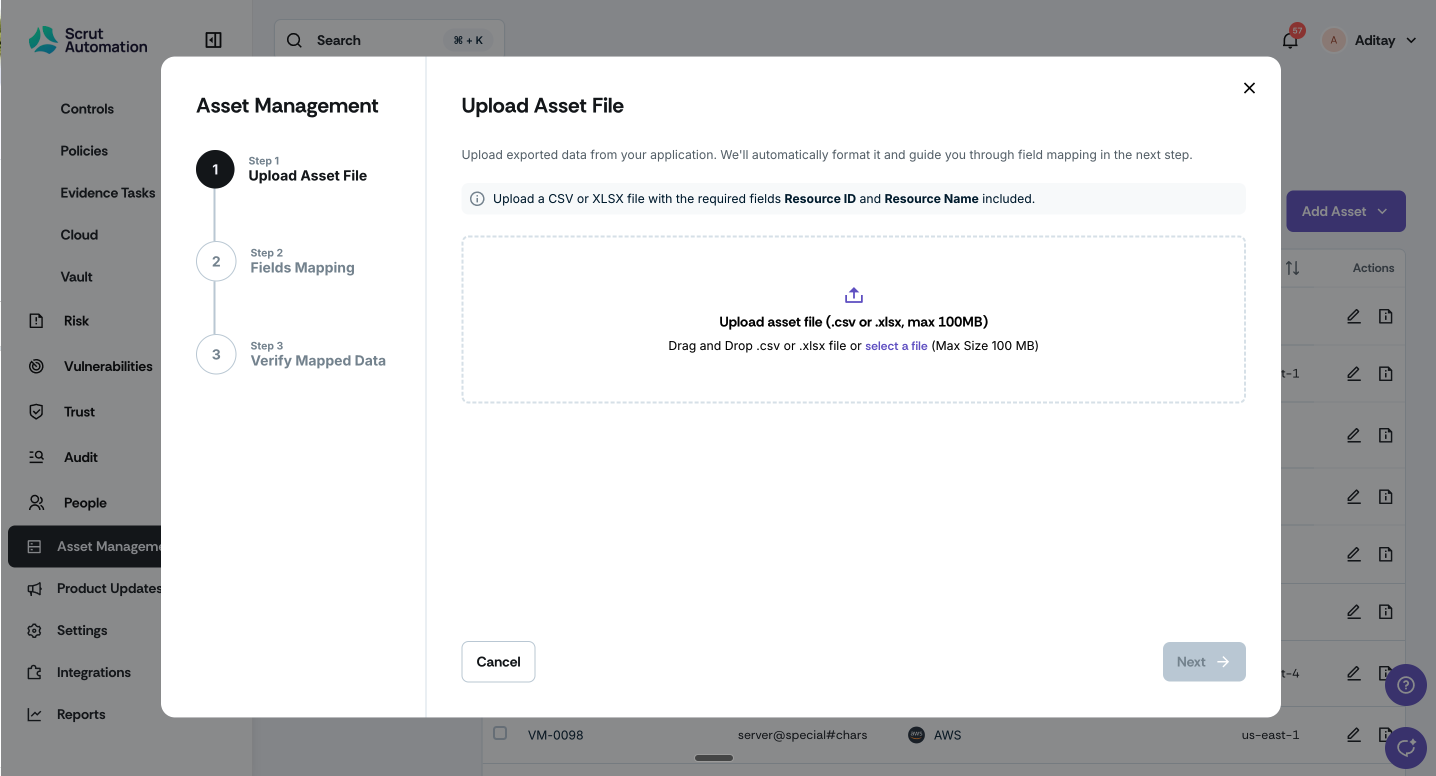
Click Asset Management on the left navigation panel and click Add Asset -> Import via CSV/XLSX.
Upload any CSV or Excel file from your existing tools or internal spreadsheets.
Use the import wizard to map each column to the relevant asset fields in Scrut.
Only two fields are mandatory:
Resource ID
Resource Name
Column names in your file don’t need to match Scrut’s field names; you can map them during import.
Complete the import and start managing your assets in Scrut.
Need help?
Your Customer Success Manager (CSM) is always ready to help if you need assistance. Explore all recent product updates → View now.