- DATE:
- AUTHOR:
- The folks at Scrut
Streamline your TPRM workflow: Introducing guided, step-by-step vendor assessment timelines
What's new?
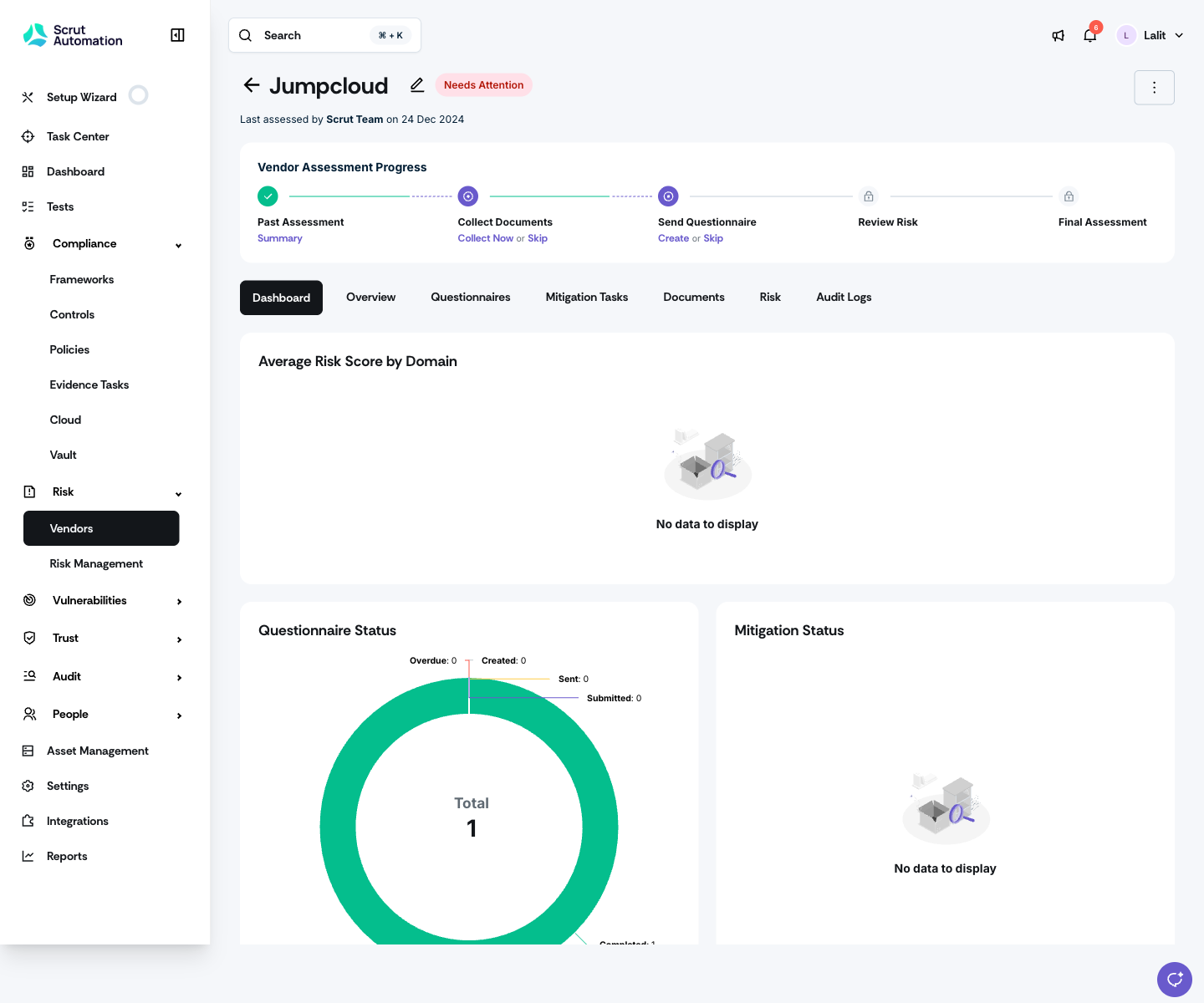
The vendor detail page now opens with a horizontal assessment timeline that walks you through each stage of the vendor assessment journey: past assessment (if applicable), collecting documents, sending a questionnaire, reviewing risk, and completing the final assessment.
Why was this needed?
The previous vendor detail view page didn't include actionable guidance, making it hard to understand what to do next or how each stage connected. Furthermore, an assessment could move to a completed state before you were ready, which created confusion. The new timeline gives you a clear view of where each vendor stands, surfaces actions in context, and keeps you in control of when a vendor is formally marked as assessed.
How it works
Navigate to Risk -> Vendors and open a vendor record.
Review the Vendor Assessment Progress timeline at the top of the vendor detail page to see which stages are complete, in progress, or pending.

Use the Collect Documents step to gather documents manually or with Scrut's assistance.
Use the Send Questionnaire step to create or skip a questionnaire and use autofill where it applies.
Complete document collection and questionnaire work in parallel. Both remain active until you finish them.
Unlock the Review Risk step once either documents or questionnaires are complete, and use AI suggestions where available.
Confirm Final Assessment when you're ready. This step does not trigger automatically.
If a new assessment cycle begins, the prior assessment collapses into a summary node, and active steps are reset for the new period.
Open the assessment summary side panel to view key details such as who completed the assessment, when, the score, and any additional notes.
Need help?
Your Customer Success Manager (CSM) is always ready to help if you need assistance. Explore all recent product updates → View now.